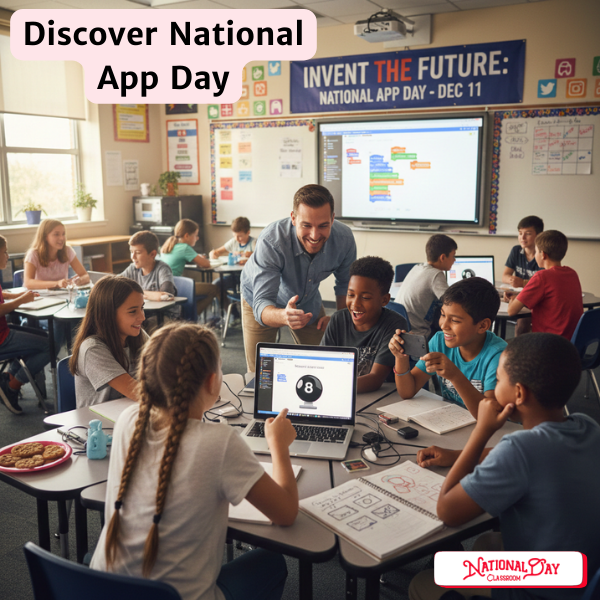
💡 App Development Classroom Lesson Plan
With National App Day on December 11, here is a lesson and study on discovering App development for students.
1. Ideation and Design (The “What” and “Why”)
This phase encourages creativity and problem-solving, which are crucial skills regardless of the final product.
- App Brainstorm Challenge:
- Start by asking students to identify a problem or inconvenience in their daily lives, their school, or their community.
- Challenge them to brainstorm an app that could solve that problem or improve the situation.
- Example: “It’s hard to remember to take the dog out every day.” $\rightarrow$ App idea: A pet-care reminder app.
- Inclusive Design Focus:
- Introduce the concept of inclusive and accessible design (making sure the app can be used by everyone, including people with different abilities, ages, or languages). Ask students to consider these factors during their design process.
- Storyboard/Prototyping:
- Have students sketch out their app idea screen-by-screen, showing the user flow (how a user moves from one screen to the next). This is the User Interface (UI) and User Experience (UX) design.
- Visual Aid: You could show a quick example of this process.
2. Introduction to Development (The “How”)
For a classroom setting, using visual, block-based programming tools is often the most accessible way to introduce coding concepts.
| Platform | Best For | Key Features |
| MIT App Inventor | Middle/High School | Uses drag-and-drop blocks (similar to Scratch) to build functional Android apps that can be tested on a device. |
| Code.org App Lab | Middle/High School | Uses block-based coding (which can switch to JavaScript) to design and code simple web-based apps. |
| Swift Playgrounds | High School | Teaches coding in Swift (Apple’s programming language) using interactive lessons to build real apps for iOS. |
| MAD-learn | K-12 | A full platform designed to guide students through the design thinking process to create an app. |
- Hands-on Block Coding:
- If time allows, guide students through a simple “Hello World” or “Magic 8-Ball” tutorial using one of the block-based platforms like App Inventor. This immediately shows them that they can bring their design ideas to life.
3. Sharing and Reflection
- App Pitch:
- Have students or groups present their app idea and/or prototype to the class. Encourage them to explain:
- The purpose of the app.
- The problem it solves.
- How they addressed inclusivity/accessibility in their design.
- Have students or groups present their app idea and/or prototype to the class. Encourage them to explain:
- Exploring Real-World Challenges (Optional for Older Students):
- You could mention challenges like the NASA App Development Challenge or the Congressional App Challenge to show students real-world opportunities for their skills.
Here is a breakdown of the best introductory lesson plans for each platform, focusing on ease of use and maximum impact for National App Day:
👩💻 Top Introductory App Development Lessons
1. MIT App Inventor (Recommended for Middle School +)
This platform is ideal because it uses simple drag-and-drop blocks to build apps that can be tested on a real phone (Android or iOS Companion App).
| Tutorial Title | Focus / Concept Taught | Timeframe |
| Hello Purr / Hello Codi! | The “Hello World” of App Inventor. Students build a button with an image that plays a sound when pressed. | ~30-45 minutes |
| Talk to Me | Introduces the Text-to-Speech component, where the app speaks a phrase when a button is clicked. | ~45-60 minutes |
| Magic 8 Ball | An excellent next step that adds randomness (using lists and selection logic) and can incorporate the accelerometer sensor (shaking the device). | ~60-90 minutes |
- Teacher Note: MIT App Inventor provides all tutorials with links to both text instructions (PDF) and video tutorials, which is great for differentiating instruction. The “Talk to Me” or “Magic 8 Ball” apps are highly engaging for a single lesson.
2. Code.org App Lab (Recommended for Middle/High School)
Code.org’s App Lab is a powerful, browser-based tool that uses block-based code that can be toggled to real JavaScript, making it an excellent bridge to professional coding.
| Project Guide | Focus / Concept Taught | Estimated Time |
| Intro to App Lab | A full guided lesson plan covering the basics of designing the UI and adding the first block of code. | Varies (Can be broken down into 45-min lessons) |
| Choose Your Adventure | Focuses on screen transitions and using buttons to control the user experience. Excellent for the design phase of your lesson. | ~60-75 minutes |
| Pet Poll / Landmark Flashcards | Teaches how to manage and display data and track user input (like votes or progress). | ~60 minutes |
- Teacher Note: Code.org offers a full Computer Science Discoveries course that uses App Lab, but the individual “Project Guides” are perfect for a one-off National App Day activity, focusing on user interaction and design.
3. Swift Playgrounds (Recommended for High School)
This platform teaches the actual Swift code used to build professional apps for Apple devices, delivered through fun, interactive puzzles. It requires an iPad or Mac.
| Course/Lesson | Focus / Concept Taught | Estimated Time |
| Learn to Code 1: Commands and Sequences | The very first lesson, introducing fundamental commands and how to execute them in order to solve a puzzle. | ~45 minutes |
| Lesson 2: Debugging | Focuses on fixing errors in code, a crucial real-world app development skill. | ~45 minutes |
| Intro to App Development with Swift | The official Apple curriculum. The early lessons are perfect for a hands-on coding introduction. | Varies (Can be used for a full semester) |
- Teacher Note: Swift Playgrounds is a deep, immersive learning experience. For a single-day lesson, focus only on the very first few puzzle lessons in the “Learn to Code 1” playground to give students a taste of real code.
🎯 Next Steps for Your Lesson
Given that you are planning a lesson for National App Day on December 11th, here are a couple of recommendations for one of the following short, engaging activities:
- For Maximum Engagement: The MIT App Inventor “Magic 8 Ball” tutorial. It’s fun, uses a device’s sensor (the shake), and clearly shows how code creates a result.
- For Design Thinking: Use the Code.org “Choose Your Adventure” guide, which strongly emphasizes the design/UX side of app development before students even write code.